
Project Overview
What we are building and how the backend works.
Goal
Build a serverless backend that automatically detects, matches, and groups faces across uploaded photos using Amazon Rekognition.
Who this is for
- Beginner-friendly: You can follow steps without prior AWS experience (we'll explain concepts + give copy/paste commands).
- Advanced-friendly: We'll also include best practices like least-privilege IAM, idempotency basics, and clean data modeling.
What you'll build
You will build an end-to-end workflow that produces:
- People clusters (each person has a
personId) - Appearances (which photos that person appears in)
- Face thumbnails (cropped faces stored in S3)
- APIs to list people and fetch photos per person (for UI integration)
Example
-
People:
personId: p_001→ appears inphoto_12,photo_13personId: p_002→ appears inphoto_14
-
Storage:
- Raw photos →
s3://<raw-bucket>/photos-raw/... - Crops/thumbnails →
s3://<processed-bucket>/people/p_001/...
- Raw photos →
AWS services used
We will use these AWS services during the build:
- Amazon S3 (raw uploads + thumbnails)
- AWS Lambda (Ingestion + API)
- Amazon Rekognition (
DetectFaces,SearchFacesByImage,IndexFaces, Collections) - Amazon DynamoDB (
photos,people,appearancestables) - Amazon API Gateway (HTTP endpoints for the client)
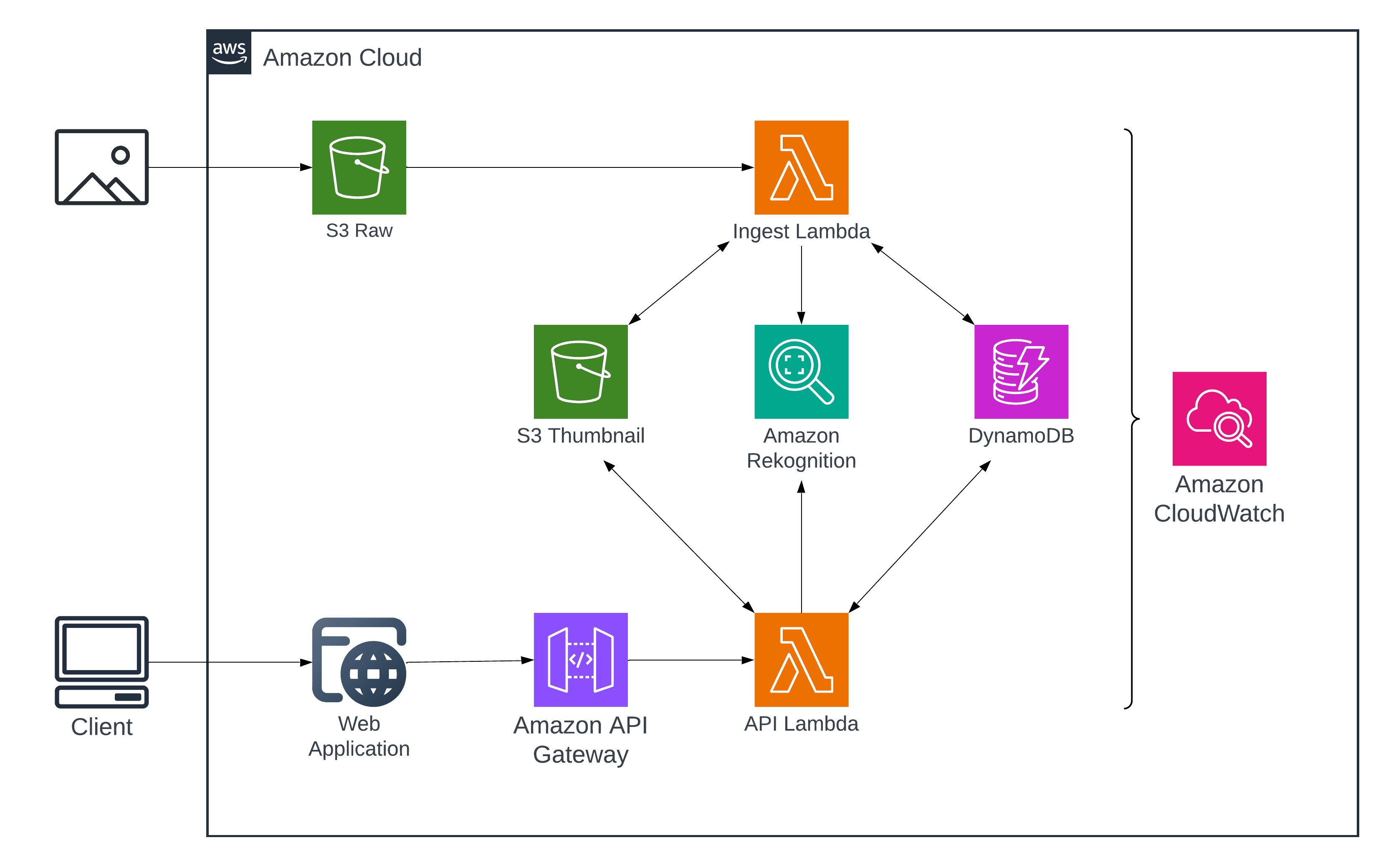
Architecture
This project uses two Lambdas:
- Ingestion Lambda (event-driven): processes new photos when S3 receives uploads
- API Lambda (client-facing): serves endpoints via API Gateway (list people, get photos for person)
- A photo is uploaded to S3 (raw bucket)
- S3 triggers Ingestion Lambda
- Lambda calls Rekognition
- Lambda stores metadata in DynamoDB
- Lambda stores face crops in S3 (processed bucket)
- Client calls for API Gateway
- API Lambda reads DynamoDB and returns clusters
What we'll do
We'll build the system in this order:
- Set up AWS tooling & environment
- Create S3 buckets + folder structure
- Create DynamoDB tables (people + appearances)
- Create a Rekognition Collection
- Write the Lambda pipeline:
- detect faces
- crop faces
- search collection
- index new faces
- group into people
- write results
- Package Pillow as a Lambda Layer
- Secure access using presigned URLs
- Add logging + troubleshooting + cleanup guide
Common Pitfalls
- Using the wrong AWS region (Rekognition Collection is region-specific)
- Missing IAM permissions for Lambda → Rekognition or Lambda → DynamoDB
- Uploading images with no visible face
- Face crop coordinates confusion (normalized vs pixel values)
We'll address each of these exactly when we reach that step.