
API Gateway Endpoint
Expose the Beetroot API Lambda using an HTTP API in API Gateway with routes, CORS, and a curl test.
Goal
By the end of this phase, you'll have a public HTTP endpoint (API Gateway) that calls your API Lambda.
Your React app will be able to call:
GET /persons
GET /persons/{personId}/photos
Mental model: API Gateway vs Lambda
API Gateway is the “front door” (public URL + routing + CORS). Lambda is the “brain” (runs your Python code and returns JSON).
Prerequisites
- Lambda:
beetroot-api(from the previous phase)
Region reminder
Create the HTTP API in the same region as your Lambda (us-east-1), otherwise the integration won't show up.
Step 1: Create an HTTP API
Create the API
- Open API Gateway
- Click Create API
- Choose HTTP API → Build
Why HTTP API (not REST API)?
HTTP API is simpler and cheaper for basic GET routes. It's a great fit for this workshop.
Add the Lambda integration
In the setup flow:
- API Name:
BeetrootAPIGateway - Under Integrations, select Lambda
- Region: us-east-1
- Choose your Lambda:
beetroot-api - Next
What “integration” means
An integration is just “what should run when someone hits this route?”. Here, the answer is your Lambda.
Define routes
| Method | Resource Path |
|---|---|
| GET | /persons |
| OPTIONS | /persons/{personId}/photos |
For both routes, choose the same integration: beetroot-api.
Why both routes use the same Lambda
Your Lambda already routes based on method and path.
API Gateway just forwards the request.
Enable CORS (important for React)
In API settings → Develop → CORS:
- Access-Control-Allow-Origin:
*(dev only) -
Access-Control-Allow-Headers:
content-type -
Access-Control-Allow-Methods:
GET, OPTIONS
CORS note
* is fine for development. In production, set this to your real
frontend domain.
Stage + deploy
HTTP APIs typically use the $default stage with Auto-deploy. So, there's no
need to click on the Deploy button.
What a stage is
A stage is a deployed version of your API. $default keeps things
simple for this workshop.
Step 2: Confirm Lambda invoke permission
API Gateway must be allowed to invoke your Lambda. Usually the console adds this automatically, but you can verify by 2 ways.
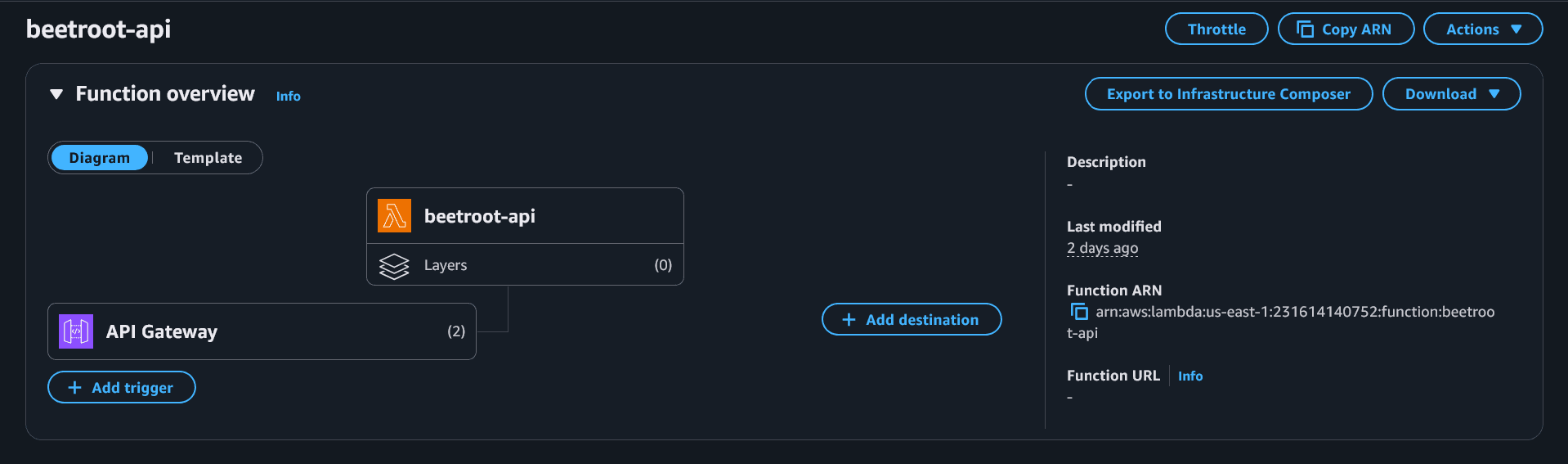
First, open the beetroot-api lambda function.
- You should see API Gateway connected to the lambda function, which gets executed on each request.
- Go to Configuration → Permissions → Resource-based policy statements and look for a statement mentioning
apigateway.amazonaws.com
If the permission is missing
If API Gateway can't invoke Lambda, you'll usually get 403 or 500. We'll cover quick fixes in Common issues.
Step 3: Get Invoke URL and test
Go to:
- API Gateway →
BeetrootAPIGateway→ Stages →$default - Copy the Invoke URL
Common issues
Most common causes:
- API Gateway does not have permission to invoke the Lambda
- You're calling the wrong URL/stage
Check:
- Lambda →
beetroot-api→ Permissions includesapigateway.amazonaws.com - API Gateway → Stages → using the correct Invoke URL
This usually means the Lambda crashed. Check:
- CloudWatch logs:
/aws/lambda/beetroot-api - Common causes:
- Missing env vars (table names)
- JSON serialization errors (Decimals) if the previous phase fix wasn't applied
If curl works but the browser fails:
- Ensure CORS is enabled in API Gateway (Allowed origins/methods/headers)
- Ensure your Lambda response includes CORS headers (we added them in
_resp)
Test
Route 1: list persons
curl -X GET "<INVOKE_URL>/persons"{
"persons": [
{
"photoCount": 4,
"createdAt": "2025-12-21T08:16:04.864553+00:00",
"personId": "a5a48144-1b50-4eca-9b93-65cf88527266",
"repThumbKey": "faces-thumbs/a5a48144-1b50-4eca-9b93-65cf88527266/9db7214ecc27b77b20eb_face_1.jpg"
},
...
]
}Route 2: photos for one person
Copy one personId from the /persons response.
curl -X GET "<INVOKE_URL>/persons/{personId}/photos"{
"personId": "a5a48144-1b50-4eca-9b93-65cf88527266",
"photos": [
{
"photoId": "4fcae858bfb8d5e935bd",
"photoBucket": "photo-clone-raw",
"photoKey": "photos-raw/r2h21.jpg",
"thumbKey": null
},
{
"photoId": "930719d43b6ebef54c53",
"photoBucket": "photo-clone-raw",
"photoKey": "photos-raw/r2h1.jpg",
"thumbKey": null
},
...
]
}What “success” looks like
You should get JSON back with status code 200 (and not 403 /
500). If /persons returns an empty list, it usually
means your Persons table is empty (upload more photos first).