
Rekognition Detect Faces
Call Rekognition DetectFaces on each uploaded photo, storing faceCount in DynamoDB.
Goal
When a photo lands in photos-raw/, the ingestion Lambda should:
- Call Rekognition DetectFaces on that S3 object
- Log how many faces were found (and bounding boxes for debugging)
- Store
faceCountin thePhotostable
What is DetectFaces?
DetectFaces scans an image and returns a list of faces it finds,
including:
- a bounding box for each face (normalized coordinates)
- confidence score
- additional attributes (optional)
We’ll use DEFAULT attributes because it’s enough for bounding boxes and confidence.
Prerequisites
Your ingestion role(beetroot-ingest-role) should already allow:
-
rekognition:DetectFaces
If not, update the role before continuing.
Detect Faces Code
What this code does
This update extends your existing “Photo Record + Idempotency” Lambda so that after a photo record is inserted:
- Rekognition scans the uploaded image
- The Lambda logs how many faces were found
- The Lambda stores
faceCountinside the DynamoDBPhotositem
That gives us two important outputs for later:
faceCount(useful for UI and debugging)BoundingBox(required for cropping face thumbnails next)
Part 1: Add the Rekognition client
Add a Rekognition client near your other AWS clients/resources.
# --- AWS clients/resources ---
ddb = boto3.resource("dynamodb")
rek = boto3.client("rekognition")
Part 2: Call detect_faces on the S3 object
After you have bucket, key, and photo_id (and after your DynamoDB insert), call Rekognition.
resp = rek.detect_faces(
    Image={"S3Object": {"Bucket": bucket, "Name": key}},
    Attributes=["DEFAULT"],
)

face_details = resp.get("FaceDetails", [])
face_count = len(face_details)

print(f"DetectFaces: photoId={photo_id} faces={face_count}")

for idx, fd in enumerate(face_details, start=1):
    bb = fd.get("BoundingBox", {})
    conf = fd.get("Confidence", None)
    print(f"  Face {idx}: confidence={conf} bbox={bb}")
Example inputs into Rekognition:
-
Bucket = beetroot-raw -
Name = photos-raw/group1.jpg -
Attributes = DEFAULT
This tells Rekognition: “scan this S3 image and return face bounding boxes + confidence.”
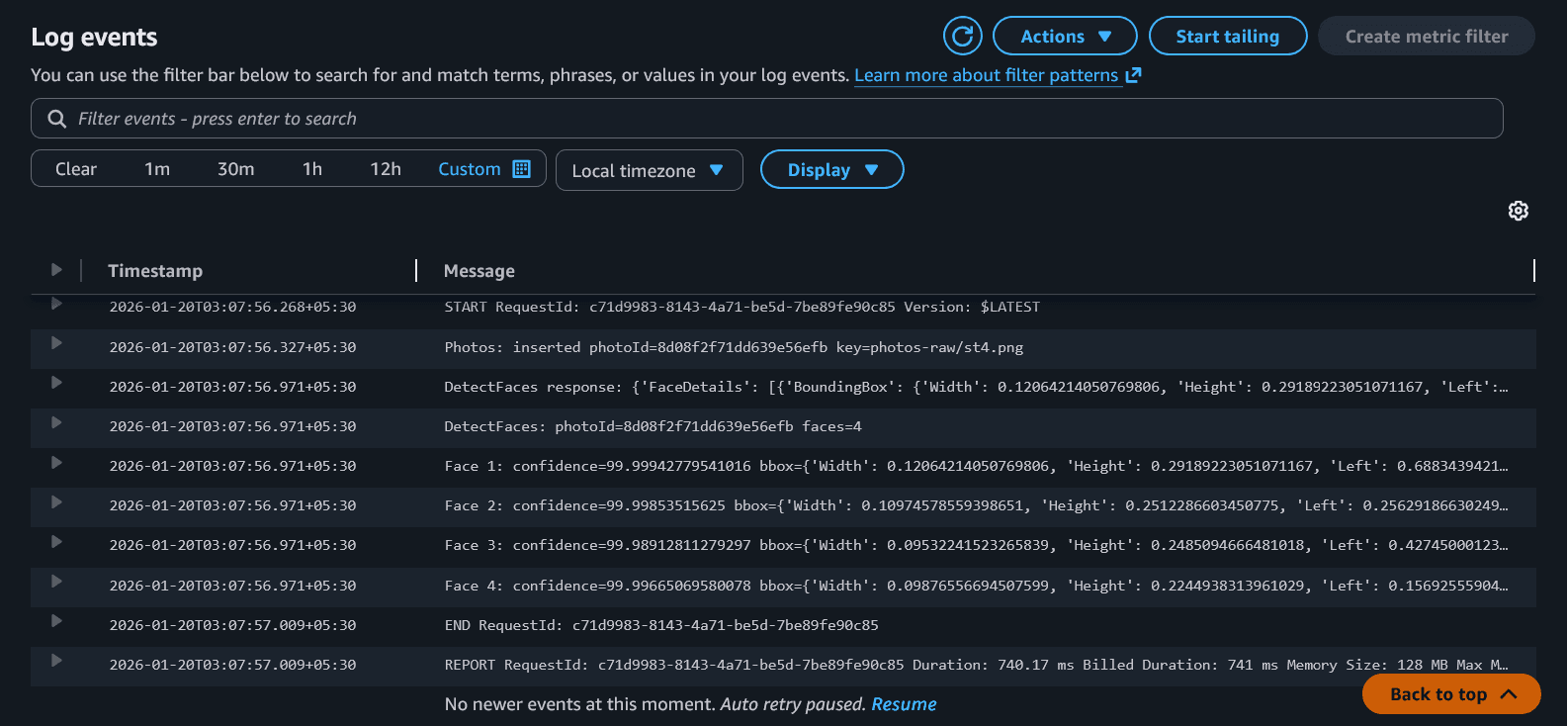
What you should see in logs:
-
DetectFaces: photoId=... faces=3 - one line per face with:
- confidence
- bounding box coordinates
The bounding boxes are normalized numbers (0 to 1) — we’ll convert them to pixels later for cropping.
How this works?
-
We pass the uploaded image location directly from S3:
Bucket→ which S3 bucket the image is inName→ the full object key (path) inside the bucketAttributes=["DEFAULT"]→ return only what we need (bounding boxes + confidence)
resp = rek.detect_faces( Image={"S3Object": {"Bucket": bucket, "Name": key}}, Attributes=["DEFAULT"], ) -
Rekognition returns a JSON response. The most important field for us are:
face_details = resp.get("FaceDetails", [])is a list where each entry represents one detected faceface_count = len(face_details)gives total faces found
face_details = resp.get("FaceDetails", []) face_count = len(face_details) -
Looping through all faces and logging:
Confidence: how sure Rekognition is that this is a real faceBoundingBox: where the face is located in the image
print(f"DetectFaces: photoId={photo_id} faces={face_count}")

for idx, fd in enumerate(face_details, start=1):
    bb = fd.get("BoundingBox", {})
    conf = fd.get("Confidence", None)
    print(f"  Face {idx}: confidence={conf} bbox={bb}")
What are bounding boxes?
A bounding box is a rectangle around a detected face. Rekognition returns it as normalized coordinates (
Left,Top,Width,Height) between 0 and 1.
Part 3: Store faceCount back into Photos table
After computing face_count, update the Photo item.
photos_table.update_item(
    Key={"photoId": photo_id},
    UpdateExpression="SET faceCount = :c",
    ExpressionAttributeValues={":c": face_count},
)
How it updates?
- Key selects the item to update:
{"photoId": photo_id} - SET creates or overwrites
faceCount - :c is a placeholder, mapped using
ExpressionAttributeValues - If
faceCountalready exists, DynamoDB overwrites it with the new value
Updated Lambda Code
Paste this into beetroot-ingest and click Deploy.
import json
import os
import hashlib
from datetime import datetime, timezone
from urllib.parse import unquote_plus

import boto3
from botocore.exceptions import ClientError

# --- AWS clients/resources ---
ddb = boto3.resource("dynamodb")
rek = boto3.client("rekognition")

# --- Env vars ---
PHOTOS_TABLE = os.environ.get("PHOTOS_TABLE", "Photos")
RAW_PREFIX = os.environ.get("RAW_PREFIX", "photos-raw/")

photos_table = ddb.Table(PHOTOS_TABLE)

def make_photo_id(bucket: str, key: str) -> str:
    raw = f"{bucket}/{key}".encode("utf-8")
    return hashlib.sha256(raw).hexdigest()[:20]

def lambda_handler(event, context):
    records = event.get("Records", [])
    if not records:
        print("No Records found; nothing to do.")
        return {"statusCode": 200, "body": "no records"}

    for r in records:
        s3 = r.get("s3", {})
        bucket = s3.get("bucket", {}).get("name")
        key = s3.get("object", {}).get("key")

        if not bucket or not key:
            print("Skipping record: missing bucket/key")
            continue

        key = unquote_plus(key)

        if not key.startswith(RAW_PREFIX):
            print(f"Skipping key not under RAW_PREFIX: {key}")
            continue

        photo_id = make_photo_id(bucket, key)
        uploaded_at = datetime.now(timezone.utc).isoformat()

        # --- Insert photo record idempotently ---
        item = {
            "photoId": photo_id,
            "s3Bucket": bucket,
            "s3Key": key,
            "uploadedAt": uploaded_at,
        }

        try:
            photos_table.put_item(
                Item=item,
                ConditionExpression="attribute_not_exists(photoId)",
            )
            print(f"Photos: inserted photoId={photo_id} key={key}")
        except ClientError as e:
            code = e.response.get("Error", {}).get("Code", "Unknown")
            if code == "ConditionalCheckFailedException":
                print(f"Photos: already exists, skipping photoId={photo_id} key={key}")
                continue
            print("DynamoDB put_item failed:", str(e))
            raise

        # --- Phase 8: Detect faces (DEFAULT) ---
        resp = rek.detect_faces(
            Image={"S3Object": {"Bucket": bucket, "Name": key}},
            Attributes=["DEFAULT"],
        )
        print(f"DetectFaces response: {resp}")

        face_details = resp.get("FaceDetails", [])
        face_count = len(face_details)

        print(f"DetectFaces: photoId={photo_id} faces={face_count}")

        for idx, fd in enumerate(face_details, start=1):
            bb = fd.get("BoundingBox", {})
            conf = fd.get("Confidence", None)
            print(f"  Face {idx}: confidence={conf} bbox={bb}")

        # Store faceCount back into Photos table
        photos_table.update_item(
            Key={"photoId": photo_id},
            UpdateExpression="SET faceCount = :c",
            ExpressionAttributeValues={":c": face_count},
        )

    return {"statusCode": 200, "body": "ingest lambda with detect_faces ok"}
Test
- Upload a group photo:
aws s3 cp ./v2-test-photos/<onefile>.jpg s3://beetroot-raw/photos-raw/<onefile>.jpg --region us-east-1-
Open CloudWatch logs for
beetroot-ingestand confirm:-
DetectFaces: photoId=... faces=... - one or more bounding box lines
-
-
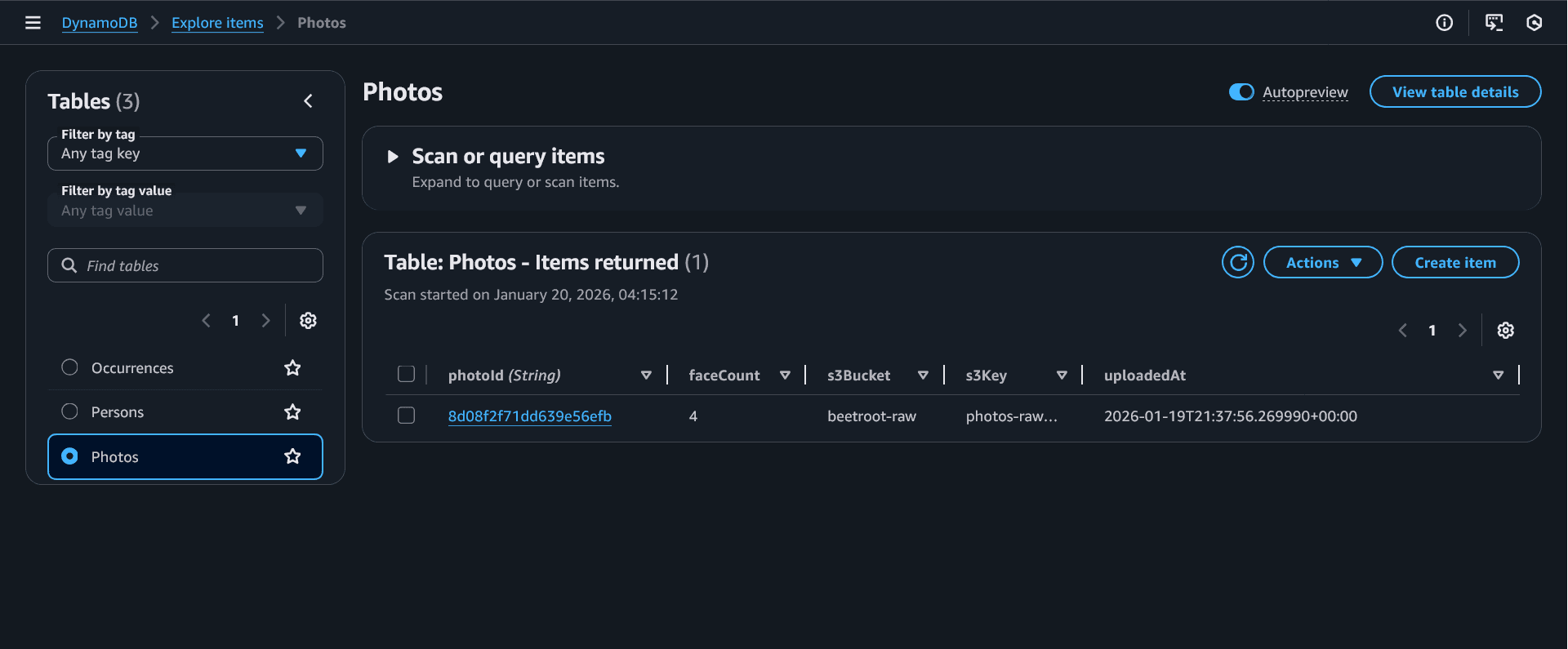
Open DynamoDB
Photosand confirm the item hasfaceCount.
Checkpoint
This is what you should see in your CloudWatch logs:
You should also see a new row with faceCount in your PHOTOS table
Common Student Questions
S3 events can include multiple records in one invocation. Looping makes the Lambda correct even if multiple uploads arrive together.
We use DEFAULT because it gives the bounding box and confidence we need for cropping. ALL adds extra details (emotions, landmarks, etc.) that we don’t need right now.
The next phase is cropping face thumbnails.
Cropping is done using the bounding box coordinates returned by DetectFaces.
It makes verification easy (“did DetectFaces work?”) and lets the UI show quick summary stats later.
Common Mistakes
If you see AccessDeniedException, your role is missing Rekognition permission (DetectFaces).
If you see InvalidImageFormatException, try a JPG/PNG with a
clear face.
If logs show faces=0, try a photo with larger, front-facing faces.