
Crop Thumbnails
Download the image, crop each detected face using bounding boxes, and upload thumbnails to S3.
Goal
When a photo upload triggers beetroot-ingest, the Lambda should:
- Download the image from the raw bucket
- Convert Rekognition bounding boxes (ratios) into pixel coordinates
- Crop each detected face into a thumbnail
- Upload thumbnails to
s3://beetroot-thumbs/faces-thumbs/<photoId>/... - (Optional) store thumbnail keys back into the
Photositem for easy debugging
Prerequisite
Make sure your Pillow layer is attached and working (from PIL import Image works).
Setup
Environment Variables
Add these environment variables in your Lambda:
THUMBS_BUCKET=beetroot-thumbsTHUMBS_PREFIX=faces-thumbs/
Increase Lambda Timeout
- Go to Lambda → beetroot-ingest
- Configuration → General configuration → Edit
- Set Timeout:
1 minute - Save
Crop Code
What this update does
Compared to the previous phase (DetectFaces), the Lambda now:
- adds an S3 client required to download and upload image bytes
- uses Pillow to crop face thumbnails
- converts
boundingBoxratios → pixels safely (with clamping) - uploads thumbnails into a stable S3 path per photo
Part 1: New imports
We add two new imports for image byte handling and cropping:
BytesIO→ treat bytes like a file objectPIL.Image→ open, crop, and save images
from io import BytesIO
from PIL import Image
Why BytesIO?
S3 gives us raw bytes. Pillow expects a “file-like” object, so we wrap bytes
in BytesIO.
Part 2: Configurations
2.1 S3 Client
We add an S3 client to download the original photo and upload thumbnails.
# --- AWS clients/resources ---
ddb = boto3.resource("dynamodb")
rek = boto3.client("rekognition")
s3 = boto3.client("s3")
2.2 Thumbnails Destination
We read where thumbnails should be stored:
THUMBS_BUCKET = os.environ["THUMBS_BUCKET"]
THUMBS_PREFIX = os.environ.get("THUMBS_PREFIX", "faces-thumbs/")
Why os.environ in case of THUMBS_BUCKET?
Use os.environ["THUMBS_BUCKET"] so the function fails fast if the variable
is missing.
Part 3: Bounding box helpers
Rekognition returns bounding boxes as ratios (0..1) and sometimes edge cases can go slightly outside the range.
3.1 Clamp values
def clamp01(x: float) -> float:
    return max(0.0, min(1.0, x))
Edge cases
clamp01(-0.20) → 0.0clamp01(1.30) → 1.0
Normal values
clamp01(0.15) → 0.15clamp01(0.80) → 0.80
3.2 Convert ratios → pixels
This turns Left/Top/Width/Height into pixel coordinates that Pillow can crop.
def bbox_to_pixels(bbox: dict, img_w: int, img_h: int) -> tuple[int, int, int, int]:
    left = clamp01(float(bbox.get("Left", 0.0)))
    top = clamp01(float(bbox.get("Top", 0.0)))
    width = float(bbox.get("Width", 0.0))
    height = float(bbox.get("Height", 0.0))

    right = clamp01(left + width)
    bottom = clamp01(top + height)

    x1 = int(left * img_w)
    y1 = int(top * img_h)
    x2 = int(right * img_w)
    y2 = int(bottom * img_h)

    x2 = max(x2, x1 + 1)
    y2 = max(y2, y1 + 1)
return x1, y1, x2, y2x1 = int(left * img_w)
y1 = int(top * img_h)
x2 = int(right * img_w)
y2 = int(bottom * img_h)img_w = 4000,img_h = 3000Left = 0.25,Top = 0.10Width = 0.20,Height = 0.25
x1 = 4000 * 0.25 = 1000y1 = 3000 * 0.10 = 300x2 = x1 + 4000 * 0.20 = 1800y2 = y1 + 3000 * 0.25 = 1050
These are the pixel crop coordinates Pillow needs.
What's the clamp for?
Clamping prevents invalid crop coordinates when bounding boxes are near image edges.
Part 4: Download the image
After DetectFaces returns face_details, we fetch the same image from S3 and load it into Pillow to crop faces.
obj = s3.get_object(Bucket=bucket, Key=key)
img_bytes = obj["Body"].read()
im = Image.open(BytesIO(img_bytes)).convert("RGB")
img_w, img_h = im.size4.1 Download the S3 object
obj = s3.get_object(Bucket=bucket, Key=key)Fetches the object metadata + body stream from S3.
4.2 Read bytes from the streaming body
img_bytes = obj["Body"].read()Extracts the Body (a streaming response) and reads it fully into raw bytes.
Why we need it?
Pillow can't crop a streaming object directly, it needs bytes (or a file-like wrapper).
4.3 Open the image with Pillow
im = Image.open(BytesIO(img_bytes)).convert("RGB")- Wraps
img_bytesinBytesIO(so it looks like a file), - Opens it using Pillow,
- Converts it to
RGB.
4.4 Capture image dimensions
img_w, img_h = im.sizeReads the image width and height in pixels.
Part 5: Crop and upload thumbnails
For every detected face, we:
- read its
BoundingBox - convert it from ratios → pixels
- crop the face region using Pillow
- save the crop to memory as a
JPEG - upload it to S3
- store the uploaded key in
thumb_keys
5.1 Loop over each detected face
thumb_keys = []
for idx, fd in enumerate(face_details, start=1):thumb_keysto store each uploaded thumbnail path.face_detailsis a list (one entry per face).idxbecomes1, 2, 3...so we can name thumbnails likeface_1.jpg,face_2.jpg, etc.
5.2 Convert the face bounding box to pixels
bbox = fd.get("BoundingBox", {})
x1, y1, x2, y2 = bbox_to_pixels(bbox, img_w, img_h)- Rekognition gives bounding boxes as ratios (
0..1). bbox_to_pixelsconverts them into real pixel coordinates based on the image size.- Output is a rectangle:
(x1, y1)is top-left(x2, y2)is bottom-right
5.3 Crop the face from image
face_im = im.crop((x1, y1, x2, y2))- Pillow's
croptakes a rectangle and returns a new image containing only that region.
This is the face thumbnail.
5.4 Save the thumbnail to memory as JPEG
out = BytesIO()
face_im.save(out, format="JPEG", quality=90)
out.seek(0)BytesIO()creates an in-memory file.- We save the cropped face into it as a
JPEG. out.seek(0)rewinds the pointer to the start so S3 can read the bytes correctly.
Common bug
If you forget out.seek(0), uploads can become empty or corrupted because the
pointer is at the end.
5.5 Build the thumbnail S3 path (key)
thumb_key = f"{THUMBS_PREFIX}{photo_id}/face_{idx}.jpg"This creates keys like:
-
faces-thumbs/a1f09c2b7e3d4a91b6c2/face_1.jpg -
faces-thumbs/a1f09c2b7e3d4a91b6c2/face_2.jpgWhy this S3 path?
Using
<photoId>/face_1.jpgkeeps thumbnails grouped per photo, which makes:- browsing in S3 easy
- debugging easy (everything for a photo is in one folder)
- cleanup easy (delete one folder to remove all thumbs for a photo)
Part 6: Upload to thumbs bucket
s3.put_object(
Bucket=THUMBS_BUCKET,
Key=thumb_key,
Body=out.getvalue(),
ContentType="image/jpeg",
)- uploads the in-memory bytes to S3
- sets
ContentTypeso the file previews correctly in the console/browser
Part 7: Store the key we uploaded
thumb_keys.append(thumb_key)Now thumb_keys will contain every thumbnail path for this photo.
Full Crop Code
thumb_keys = []
for idx, fd in enumerate(face_details, start=1):
bbox = fd.get("BoundingBox", {})
x1, y1, x2, y2 = bbox_to_pixels(bbox, img_w, img_h)
face_im = im.crop((x1, y1, x2, y2))
out = BytesIO()
face_im.save(out, format="JPEG", quality=90)
out.seek(0)
thumb_key = f"{THUMBS_PREFIX}{photo_id}/face_{idx}.jpg"
s3.put_object(
Bucket=THUMBS_BUCKET,
Key=thumb_key,
Body=out.getvalue(),
ContentType="image/jpeg",
)
thumb_keys.append(thumb_key)
print(f"Thumbnails: uploaded {len(thumb_keys)} to s3://{THUMBS_BUCKET}/{THUMBS_PREFIX}{photo_id}/")Updated Lambda Code
Paste and deploy:
import json
import os
import hashlib
from datetime import datetime, timezone
from urllib.parse import unquote_plus
from io import BytesIO
import boto3
from botocore.exceptions import ClientError
from PIL import Image
ddb = boto3.resource("dynamodb")
s3 = boto3.client("s3")
rek = boto3.client("rekognition")
PHOTOS_TABLE_NAME = os.environ.get("PHOTOS_TABLE", "Photos")
RAW_PREFIX = os.environ.get("RAW_PREFIX", "photos-raw/")
THUMBS_BUCKET = os.environ["THUMBS_BUCKET"]
THUMBS_PREFIX = os.environ.get("THUMBS_PREFIX", "faces-thumbs/")
photos_table = ddb.Table(PHOTOS_TABLE_NAME)
def make_photo_id(bucket: str, key: str) -> str:
raw = f"{bucket}/{key}".encode("utf-8")
return hashlib.sha256(raw).hexdigest()[:20]
def clamp01(x: float) -> float:
return max(0.0, min(1.0, x))
def bbox_to_pixels(bbox: dict, img_w: int, img_h: int) -> tuple[int, int, int, int]:
left = clamp01(float(bbox.get("Left", 0.0)))
top = clamp01(float(bbox.get("Top", 0.0)))
width = float(bbox.get("Width", 0.0))
height = float(bbox.get("Height", 0.0))
right = clamp01(left + width)
bottom = clamp01(top + height)
x1 = int(left * img_w)
y1 = int(top * img_h)
x2 = int(right * img_w)
y2 = int(bottom * img_h)
x2 = max(x2, x1 + 1)
y2 = max(y2, y1 + 1)
return x1, y1, x2, y2
def lambda_handler(event, context):
records = event.get("Records", [])
if not records:
print("No Records in event; exiting.")
return {"statusCode": 200, "body": "no records"}
for record in records:
s3_info = record.get("s3", {})
bucket = s3_info.get("bucket", {}).get("name")
key = s3_info.get("object", {}).get("key")
if not bucket or not key:
print("Skipping record: missing bucket/key")
continue
key = unquote_plus(key)
if not key.startswith(RAW_PREFIX):
print(f"Skipping key outside RAW_PREFIX ({RAW_PREFIX}): {key}")
continue
photo_id = make_photo_id(bucket, key)
uploaded_at = datetime.now(timezone.utc).isoformat()
item = {
"photoId": photo_id,
"s3Bucket": bucket,
"s3Key": key,
"uploadedAt": uploaded_at,
}
try:
photos_table.put_item(
Item=item,
ConditionExpression="attribute_not_exists(photoId)",
)
print(f"Photos: inserted photoId={photo_id} key={key}")
except ClientError as e:
code = e.response.get("Error", {}).get("Code", "Unknown")
if code == "ConditionalCheckFailedException":
print(f"Photos: already exists; skipping photoId={photo_id} key={key}")
continue
print("DynamoDB put_item failed:", str(e))
raise
resp = rek.detect_faces(
Image={"S3Object": {"Bucket": bucket, "Name": key}},
Attributes=["DEFAULT"],
)
face_details = resp.get("FaceDetails", [])
face_count = len(face_details)
print(f"DetectFaces: photoId={photo_id} faces={face_count}")
photos_table.update_item(
Key={"photoId": photo_id},
UpdateExpression="SET faceCount = :c",
ExpressionAttributeValues={":c": face_count},
)
if face_count == 0:
print(f"No faces; done for photoId={photo_id}")
continue
obj = s3.get_object(Bucket=bucket, Key=key)
img_bytes = obj["Body"].read()

im = Image.open(BytesIO(img_bytes)).convert("RGB")
img_w, img_h = im.size
thumb_keys = []
for idx, fd in enumerate(face_details, start=1):
bbox = fd.get("BoundingBox", {})
x1, y1, x2, y2 = bbox_to_pixels(bbox, img_w, img_h)
face_im = im.crop((x1, y1, x2, y2))
out = BytesIO()
face_im.save(out, format="JPEG", quality=90)
out.seek(0)
thumb_key = f"{THUMBS_PREFIX}{photo_id}/face_{idx}.jpg"
s3.put_object(
    Bucket=THUMBS_BUCKET,
    Key=thumb_key,
    Body=out.getvalue(),
    ContentType="image/jpeg",
)
thumb_keys.append(thumb_key)
print(f"Thumbnails: uploaded {len(thumb_keys)} to s3://{THUMBS_BUCKET}/{THUMBS_PREFIX}{photo_id}/")
return {"statusCode": 200, "body": "ingest lambda with crop ok"}Test
Upload a group photo
aws s3 cp ./v2-test-photos/group4.jpg s3://beetroot-raw/photos-raw/ --region us-east-1In CloudWatch logs, confirm:
- `DetectFaces: ... faces==N;`
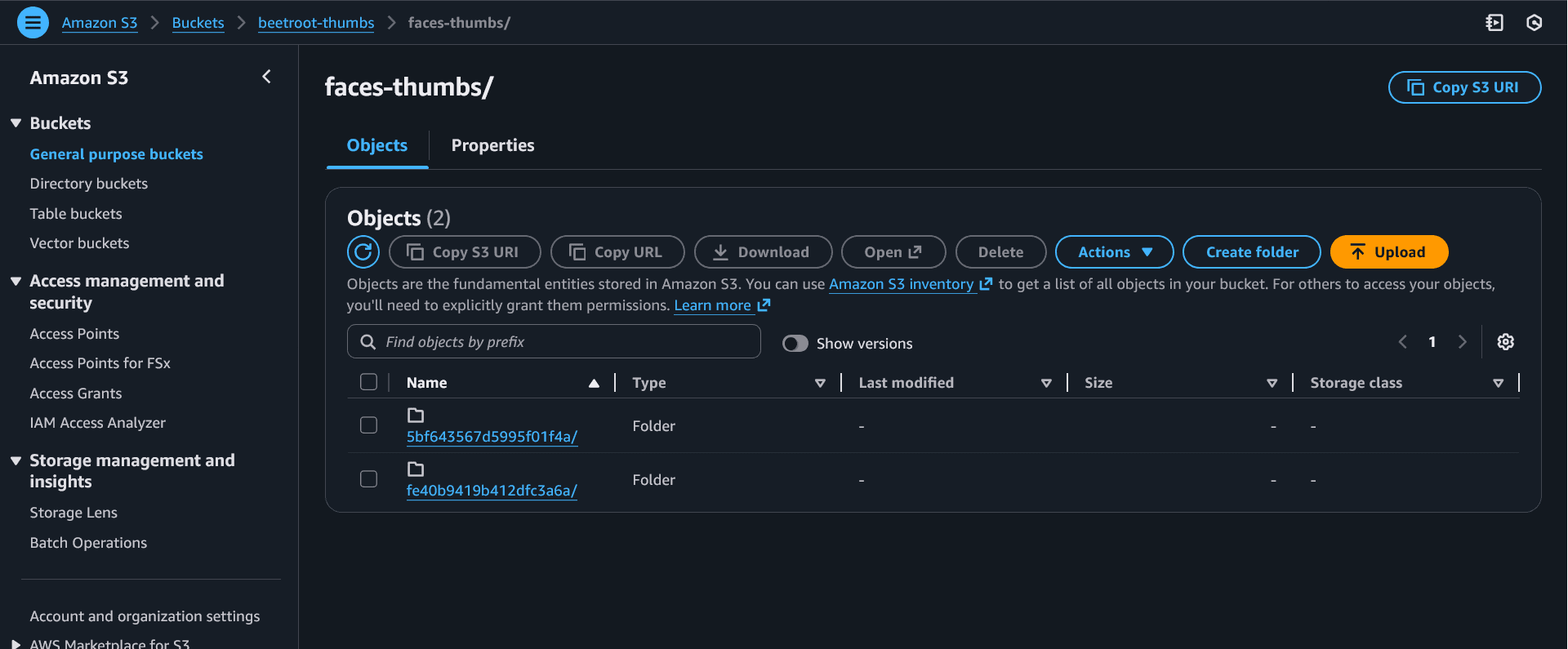
- `Thumbnails: uploaded N ...`Verify thumbnails in S3
Go to the thumbs bucket and confirm files exist under:

- `faces-thumbs/<photoId>/face_1.jpg`
- `faces-thumbs/<photoId>/face_2.jpg`
- ...
Common mistakes
If logs stop after DetectFaces... and you see a report like:
Duration: 3000.00 ms, your Lambda is timing out before cropping/uploading.
Fix: Increase Configuration → General configuration:
- Timeout:
1 minute
If you see No module named 'PIL', your Pillow layer isn't attached or the layer zip structure is wrong.
If you see AccessDenied for S3, your role is missing:
- raw bucket read:
s3:GetObject - thumbs bucket write:
s3:PutObject
If logs show faces=0, try a photo with larger, front-facing faces and better
lighting.
If thumbnails upload but look broken/empty, ensure:
- you call
out.seek(0) - you upload
out.getvalue()(bytes)
Student questions
Some images may be PNG or have different modes. Converting to RGB ensures we can consistently save JPEG thumbnails.
Bounding boxes near edges can be slightly outside the image. Clamping prevents invalid crop coordinates.