
Search or Index Faces
Search the collection for each face; if no match is found, index it and save thumbnails grouped by personId.
Goal
For every detected face, the ingestion Lambda should:
- Crop a face thumbnail (we already do this)
- Try to match it using
SearchFacesByImage - If matched, reuse that
FaceIdaspersonId - If not matched, add it to rekognition collection using
IndexFaces - Upload the thumbnail under:
What is personId in this project?
In beetroot, we treat Rekognition’s FaceId as our personId. That
means “a person cluster” is represented by one Rekognition face entry in the
collection.
Setup
Environment variables
REKOGNITION_COLLECTION_ID=beetroot-facesFACE_MATCH_THRESHOLD=95(optional)
Match or Index Code
What this update does
Compared to the previous phase (crop + upload), we add two abilities inside the face loop:
- Search: Try to find an existing person using
SearchFacesByImage - Index: If no match is found, add the face to the collection using
IndexFaces
This makes your Rekognition collection “learn” new faces over time.
Part 1: Search for an existing person (Done)
search_resp = rek.search_faces_by_image(
    CollectionId=collection_id,
    Image={"Bytes": face_bytes},
    MaxFaces=1,
    FaceMatchThreshold=threshold,
)

matches = search_resp.get("FaceMatches", [])Bytes: the cropped face image (in memory)MaxFaces=1: return only the best matchFaceMatchThreshold=95: stricter matching
- If matched:
FaceMatcheshas 1 item - If not matched:
FaceMatchesis an empty list
Part 2: Match vs NoMatch
2.1 If match exists
if matches:
    top = matches[0]
    person_id = top["Face"]["FaceId"]
    similarity = top.get("Similarity")
    print(f"Match: idx={idx} personId={person_id} similarity={similarity}")
2.2 If no match, index the face
If there is no match, we add this new face to the collection.
else:
    # 2) No match -> Index face into the collection
    print(f"NoMatch: idx={idx} threshold={FACE_MATCH_THRESHOLD} -> indexing")
    index_resp = rek.index_faces(
        CollectionId=collection_id,
        Image={"Bytes": face_bytes},
        ExternalImageId=f"{photo_id}_face_{idx}",
        MaxFaces=1,
        DetectionAttributes=["DEFAULT"],
)Bytes: same cropped face bytesExternalImageId: helpful label for debuggingMaxFaces=1: we are indexing one cropped face
FaceRecordscontains the newly indexed face- It remembers the face in form of
FaceId - We extract the new
FaceIdand treat it aspersonId
Then read the result:
records2 = index_resp.get("FaceRecords", [])
if not records2:
    print("IndexFaces failed; UnindexedFaces=", index_resp.get("UnindexedFaces", []))
    continue

person_id = records2[0]["Face"]["FaceId"]
print(f"Indexed: idx={idx} new personId={person_id}")
Why indexing is necessary
If you never call IndexFaces, the collection stays empty, so searches will
always return NoMatch.
Part 3: Upload thumbnails grouped by personId
Once we have person_id (from match or index), we upload the face thumbnail under that folder:
    thumb_key = f"{THUMBS_PREFIX}{photo_id}/face_{idx}.jpg"
    thumb_key = f"{THUMBS_PREFIX}{person_id}/{photo_id}_face_{idx}.jpg"
    s3.put_object(
        Bucket=THUMBS_BUCKET,
        Key=thumb_key,
        Body=face_bytes,
        ContentType="image/jpeg",
    )

print(f"Thumbnails: uploaded {len(thumb_keys)} to s3://{THUMBS_BUCKET}/{THUMBS_PREFIX}{photo_id}/")
print(f"Thumbnails: uploaded {len(thumb_keys)} for photoId={photo_id}")
Example values at runtime:
THUMBS_BUCKET = "beetroot-thumbs"THUMBS_PREFIX = "faces-thumbs/"person_id = "9ff9"photo_id = "feef"idx = 2face_bytes= in-memory JPEG bytes of the cropped face
What happens:
- A new object is created under
beetroot-thumbsS3 bucket at:faces-thumbs/9ff9/feef_face_2.jpg
Where to confirm:
- S3 →
beetroot-thumbs - Open prefix:
faces-thumbs/<personId>/ - You should see one file per detected face (
..._face_1.jpg,..._face_2.jpg, etc.)
Why we changed the thumbnail path
We switched from grouping thumbnails by photoId to grouping by personId.
Old path:
{faces-thumbs/<photoId>/face_1.jpg}Good for debugging one upload, but it scatters the same person’s faces across many folders.
New path:
{faces-thumbs/<personId>/<photoId>_face_1.jpg}Better for the “People” view later: one folder contains all thumbnails for the same person, across all photos.
Why this S3 path?
Storing thumbnails as <personId>/<photoId>_face_<n>.jpg
keeps all faces of the same person together. That makes the later “People
grid” API and UI much easier to build and debug.
Test
First upload (new people)
Upload a group photo where faces are new. In logs you should see:

- `NoMatch ... -> indexing`
- `Indexed ... new personId=...`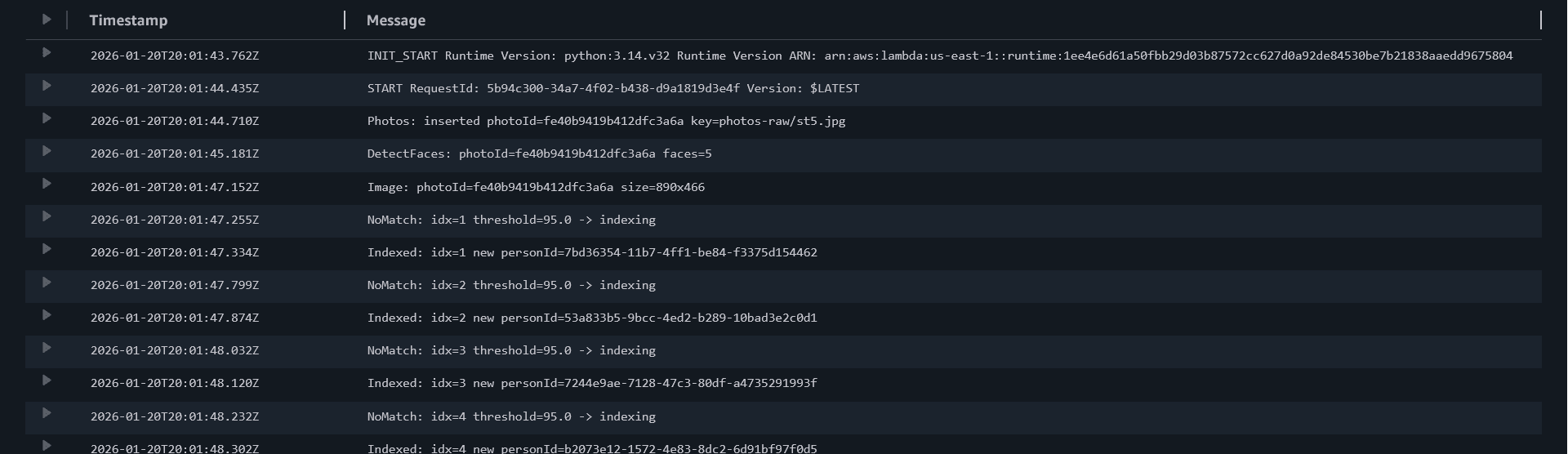
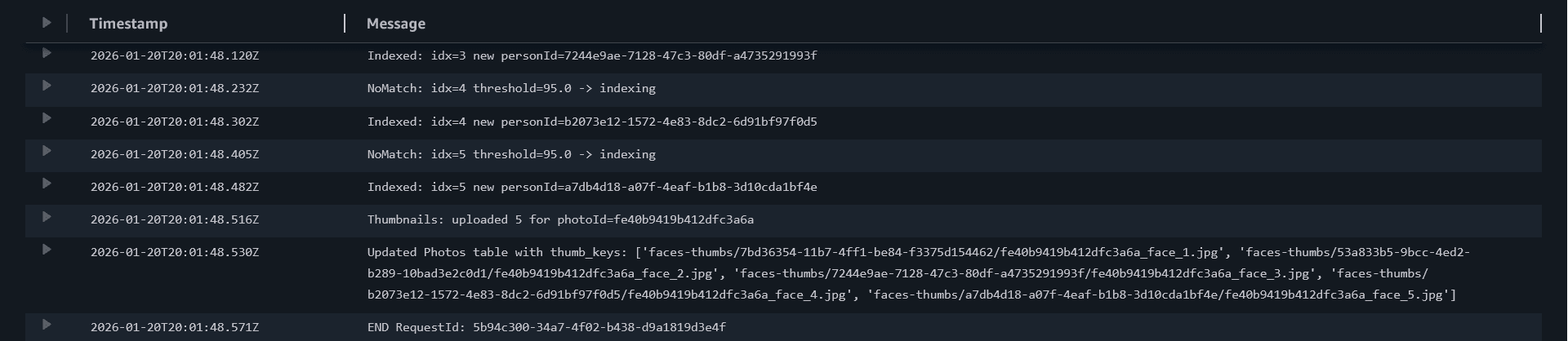
Second upload (repeated faces)
Upload another photo containing at least one of the same people.
In logs you should start seeing:

- `Match ... similarity=...`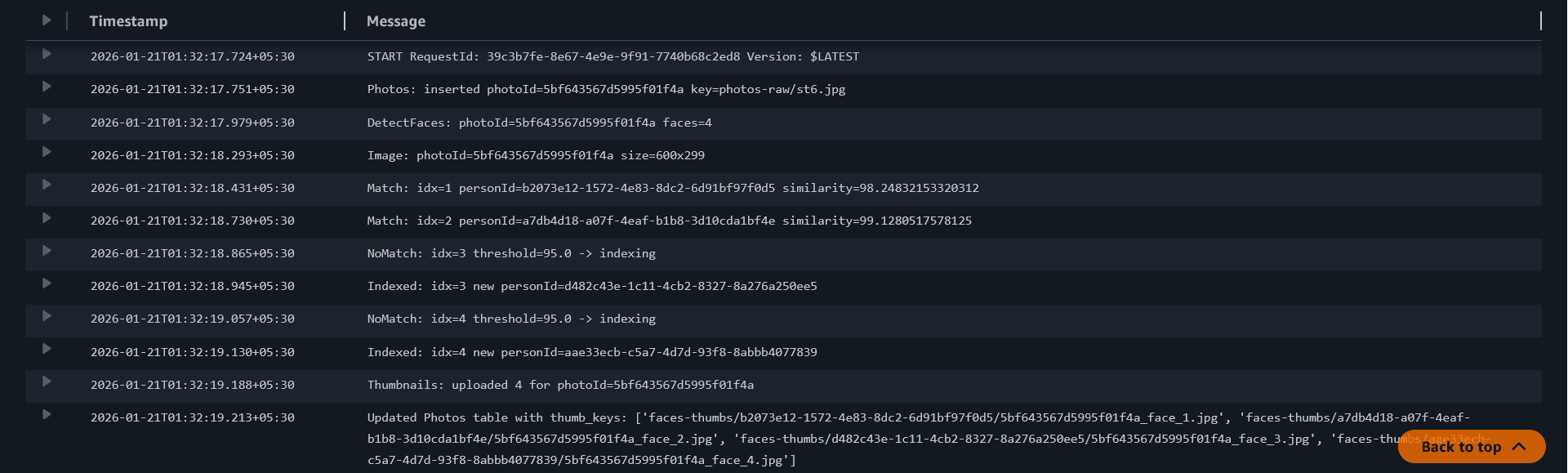
Updated Lambda Code
Paste this and deploy:
import json
import os
import hashlib
from datetime import datetime, timezone
from urllib.parse import unquote_plus
from io import BytesIO

import boto3
from botocore.exceptions import ClientError
from PIL import Image

ddb = boto3.resource("dynamodb")
s3 = boto3.client("s3")
rek = boto3.client("rekognition")

PHOTOS_TABLE_NAME = os.environ.get("PHOTOS_TABLE", "Photos")
RAW_PREFIX = os.environ.get("RAW_PREFIX", "photos-raw/")

THUMBS_BUCKET = os.environ["THUMBS_BUCKET"]
THUMBS_PREFIX = os.environ.get("THUMBS_PREFIX", "faces-thumbs/")

collection_id = os.environ["REKOGNITION_COLLECTION_ID"]
threshold = float(os.environ.get("FACE_MATCH_THRESHOLD", "95"))

photos_table = ddb.Table(PHOTOS_TABLE_NAME)

def make_photo_id(bucket: str, key: str) -> str:
    raw = f"{bucket}/{key}".encode("utf-8")
    return hashlib.sha256(raw).hexdigest()[:20]

def clamp01(x: float) -> float:
    return max(0.0, min(1.0, x))

def bbox_to_pixels(bbox: dict, img_w: int, img_h: int) -> tuple[int, int, int, int]:
    left = clamp01(float(bbox.get("Left", 0.0)))
    top = clamp01(float(bbox.get("Top", 0.0)))
    width = float(bbox.get("Width", 0.0))
    height = float(bbox.get("Height", 0.0))

    right = clamp01(left + width)
    bottom = clamp01(top + height)

    x1 = int(left * img_w)
    y1 = int(top * img_h)
    x2 = int(right * img_w)
    y2 = int(bottom * img_h)

    x2 = max(x2, x1 + 1)
    y2 = max(y2, y1 + 1)
    return x1, y1, x2, y2

def lambda_handler(event, context):
    records = event.get("Records", [])
    if not records:
        print("No Records in event; exiting.")
        return {"statusCode": 200, "body": "no records"}

    for record in records:
        s3_info = record.get("s3", {})
        bucket = s3_info.get("bucket", {}).get("name")
        key = s3_info.get("object", {}).get("key")

        if not bucket or not key:
            print("Skipping record: missing bucket/key")
            continue

        key = unquote_plus(key)

        if not key.startswith(RAW_PREFIX):
            print(f"Skipping key outside RAW_PREFIX ({RAW_PREFIX}): {key}")
            continue

        photo_id = make_photo_id(bucket, key)
        uploaded_at = datetime.now(timezone.utc).isoformat()

        item = {
            "photoId": photo_id,
            "s3Bucket": bucket,
            "s3Key": key,
            "uploadedAt": uploaded_at,
        }

        try:
            photos_table.put_item(
                Item=item,
                ConditionExpression="attribute_not_exists(photoId)",
            )
            print(f"Photos: inserted photoId={photo_id} key={key}")
        except ClientError as e:
            code = e.response.get("Error", {}).get("Code", "Unknown")
            if code == "ConditionalCheckFailedException":
                print(f"Photos: already exists; skipping photoId={photo_id} key={key}")
                continue
            print("DynamoDB put_item failed:", str(e))
            raise

        resp = rek.detect_faces(
            Image={"S3Object": {"Bucket": bucket, "Name": key}},
            Attributes=["DEFAULT"],
        )

        face_details = resp.get("FaceDetails", [])
        face_count = len(face_details)
        print(f"DetectFaces: photoId={photo_id} faces={face_count}")

        photos_table.update_item(
            Key={"photoId": photo_id},
            UpdateExpression="SET faceCount = :c",
            ExpressionAttributeValues={":c": face_count},
        )

        if face_count == 0:
            print(f"No faces; done for photoId={photo_id}")
            continue

        obj = s3.get_object(Bucket=bucket, Key=key)
        img_bytes = obj["Body"].read()

        im = Image.open(BytesIO(img_bytes)).convert("RGB")
        img_w, img_h = im.size

        print(f"Image: photoId={photo_id} size={img_w}x{img_h}")

        thumb_keys = []

        for idx, fd in enumerate(face_details, start=1):
            bbox = fd.get("BoundingBox", {})
            x1, y1, x2, y2 = bbox_to_pixels(bbox, img_w, img_h)

            face_im = im.crop((x1, y1, x2, y2))

            out = BytesIO()
            face_im.save(out, format="JPEG", quality=90)
            out.seek(0)

            face_bytes = out.getvalue()

            # 1) Search for match
            search_resp = rek.search_faces_by_image(
                CollectionId=collection_id,
                Image={"Bytes": face_bytes},
                MaxFaces=1,
                FaceMatchThreshold=threshold,
            )

            # 2) Match or no match
            matches = search_resp.get("FaceMatches", [])
            if matches:
                top = matches[0]
                person_id = top["Face"]["FaceId"]  # personId == FaceId (your chosen rule)
                similarity = top.get("Similarity")
                print(f"Match: idx={idx} personId={person_id} similarity={similarity}")
            else:
                # 2) No match -> Index face into the collection
                print(f"NoMatch: idx={idx} threshold={threshold} -> indexing")
                index_resp = rek.index_faces(
                    CollectionId=collection_id,
                    Image={"Bytes": face_bytes},
                    ExternalImageId=f"{photo_id}_face_{idx}",
                    MaxFaces=1,
                    DetectionAttributes=["DEFAULT"],
                )

                records2 = index_resp.get("FaceRecords", [])
                if not records2:
                    print("IndexFaces failed; UnindexedFaces=", index_resp.get("UnindexedFaces", []))
                    continue

                person_id = records2[0]["Face"]["FaceId"]
                print(f"Indexed: idx={idx} new personId={person_id}")

            thumb_key = f"{THUMBS_PREFIX}{person_id}/{photo_id}_face_{idx}.jpg"
            s3.put_object(
                Bucket=THUMBS_BUCKET,
                Key=thumb_key,
                Body=face_bytes,
                ContentType="image/jpeg",
            )

            thumb_keys.append(thumb_key)

        print(f"Thumbnails: uploaded {len(thumb_keys)} for photoId={photo_id}")

        photos_table.update_item(
            Key={"photoId": photo_id},
            UpdateExpression="SET faceThumbKeys = :k",
            ExpressionAttributeValues={":k": thumb_keys},
        )

        print(f"Updated Photos table with thumb_keys: {thumb_keys}")

    return {"statusCode": 200, "body": "ingest lambda with match and index ok"}
Common issues
If you see AccessDeniedException, your role is missing:
rekognition:SearchFacesByImage and/or rekognition:IndexFaces.
If you see ResourceNotFoundException, your collection ID is wrong or you
created it in a different region.
If you always see NoMatch, it usually means indexing is not happening (or
failing). Check for Indexed: logs.
If logs show UnindexedFaces, Rekognition rejected the face (too small, blurry, extreme angle). Try a clearer, larger face.
Student questions
SearchFacesByImage can only match faces that are already
indexed in the collection. On the first photo, your collection may be empty,
so NoMatch is normal until IndexFaces runs.
Q: What does FACE_MATCH_THRESHOLD=95 mean?
A: Higher threshold = stricter matching (fewer wrong matches, but more
“new people”). Lower threshold = more matches (but higher risk of mixing
different people).
We pass Image={"Bytes": ...} instead of S3 object because
we already have the cropped face in memory (BytesIO), so we can search/index
without uploading it first. This keeps the loop faster and simpler.
Yes. Rekognition charges per API call, and collections store face metadata. For the workshop, keep uploads small and delete collections/faces when done.